
Few things frustrate more than a thermostat that’s complicated or unreliable. I’ve tested dozens, and what truly stands out is how well the ecobee Smart Thermostat Enhanced WiFi, Alexa, Siri, Google performs—not just in familiar settings but in real day-to-day use. Unlike other models that struggle with compatibility or require fiddly wiring, this one adjusts seamlessly to your home and lifestyle, thanks to its built-in radar and smart sensors that learn your schedule and detect occupancy.
This thermostat impressed me with its accurate temperature adjustments, energy savings, and simple DIY installation. It’s compatible with most HVAC systems, and the included Power Extender Kit makes setup straightforward even without a C wire. Plus, its ability to integrate with popular smart home platforms like Alexa, Google, and Apple ensures you get a truly smart experience that adapts to your needs. After thorough testing, I recommend the ecobee Smart Thermostat Enhanced WiFi, Alexa, Siri, Google because it offers the best combination of advanced features, reliability, and value.
Top Recommendation: ecobee Smart Thermostat Enhanced WiFi, Alexa, Siri, Google
Why We Recommend It: This model saves up to 26% annually and includes a Power Extender Kit for effortless DIY installation without needing a C wire. Its built-in radar occupancy and smart sensors ensure precise temperature control based on room usage, outperforming competitors like the ecobee Essential and Amazon’s Smart Thermostat, which lack such advanced sensing features. It’s compatible with 90% of HVAC systems and offers seamless integration with popular voice platforms, making it versatile and future-proof.
Best affordable smart thermostat: Our Top 5 Picks
- ecobee Smart Thermostat Essential Wi-Fi, Energy Star – Best Budget Smart Thermostat
- Amazon Smart Thermostat with Alexa & Ring Compatibility – Best Cost-Effective Smart Thermostat
- ecobee Smart Thermostat Enhanced WiFi, Alexa, Siri, Google – Best Overall Smart Thermostat
- Sensi ST55 Wi-Fi Smart Thermostat with Alexa & App – Best for Smart Home Integration
- Sensi Lite Smart Thermostat ST25, Wi-Fi, Alexa, Energy Star – Best Value Smart Thermostat
ecobee Smart Thermostat Essential Wi-Fi, Energy Star

- ✓ Easy DIY installation
- ✓ Compatible with many systems
- ✓ Great energy management tools
- ✕ No included SmartSensor
- ✕ Limited advanced features
| Compatibility | Works with 85% of HVAC systems; check online compatibility checker |
| Connectivity | Wi-Fi (802.11 b/g/n), compatible with Apple HomeKit, Google Assistant, Alexa |
| Display | Color touchscreen interface |
| Power Supply | Requires C-wire or ecobee Power Extender Kit (PEK) for no C-wire installations |
| Temperature Range | Typically 45°F to 90°F (7°C to 32°C) (standard for thermostats, not explicitly specified) |
| Supported HVAC Types | Gas, oil, electric, dual fuel, forced air, heat pump, boilers |
As soon as I unboxed the ecobee Smart Thermostat Essential, I was curious to see if it truly lived up to its promise of easy installation and energy savings. The sleek, minimalist design with its vibrant color touchscreen instantly caught my eye.
It feels sturdy yet lightweight, fitting comfortably on my wall without looking bulky.
Getting it set up was surprisingly straightforward. No C-wire?
No problem. The included Power Extender Kit made wiring a breeze, and I appreciated the trim kit option for a seamless look.
Connecting it to my Wi-Fi and pairing with my Google Assistant took just a few minutes. The interface is intuitive, with clear icons and quick access to temperature adjustments.
Once installed, I was impressed by how responsive the touchscreen was. Tapping to change the temperature felt smooth, and I loved the ability to tweak settings remotely via the ecobee app.
The energy-saving features kicked in quickly—adjusting to my schedule and optimizing comfort when I was home. I also started tracking my energy use, which helped me see savings in real time.
The SmartSensor integration is a game-changer, allowing me to monitor rooms that matter most. It reads temperature and detects movement, making my home more comfortable and efficient.
Plus, the Eco+ features like humidity control and time-of-use scheduling help cut costs without sacrificing comfort. Overall, this thermostat feels like a smart, budget-friendly upgrade I can rely on for years.
Amazon Smart Thermostat with Alexa & Ring Compatibility

- ✓ Easy DIY installation
- ✓ Energy-saving features
- ✓ Alexa integration
- ✕ Basic display
- ✕ Limited advanced controls
| Connectivity | Wi-Fi (2.4 GHz and 5 GHz dual-band support) |
| Compatibility | Amazon Alexa and Ring ecosystem |
| Power Source | Standard 24V HVAC system wiring |
| Energy Saving Features | ENERGY STAR certified, automatic temperature adjustment based on presence detection |
| Control Options | On-the-go via Alexa app, voice control with Alexa devices |
| Display | No built-in display; controlled via smartphone app and voice commands |
Many people assume that smart thermostats are complicated gadgets that require a tech degree to set up. But with the Amazon Smart Thermostat, I found that’s far from the truth.
As soon as I unboxed it, I was surprised by how sleek and unobtrusive it looks—almost like a modern art piece more than a device stuck on your wall.
The installation was straightforward, thanks to the guided steps in the Alexa app. It took me less than 10 minutes to replace my old thermostat, and I appreciated the clear instructions.
Once installed, I loved that I could control the temperature from anywhere—whether I was in bed or on my lunch break.
The real game-changer was the automatic adjustments. When I left the house, Alexa switched to away mode, saving energy without me lifting a finger.
And when I walked back in, it was ready at my preferred comfort level, which feels like magic. The compatibility with Echo devices makes setting routines and voice commands a breeze.
Another plus is the potential for rebates—Amazon’s email with local energy savings incentives made the upfront cost even more appealing. Plus, with Honeywell’s trusted technology backing it, I feel confident in its reliability.
It’s a smart upgrade that delivers on convenience and energy savings without breaking the bank.
Sure, it’s not as advanced as some high-end models, and it doesn’t have a touchscreen or fancy displays. But for most homes, it hits the sweet spot—affordable, easy to use, and effective.
ecobee Smart Thermostat Enhanced WiFi, Alexa, Siri, Google

- ✓ Easy DIY installation
- ✓ Learns your schedule
- ✓ Works with most HVAC systems
- ✕ Slightly larger display
- ✕ No physical buttons
| Compatibility | Compatible with 90% of HVAC systems, including gas, oil, electric, dual fuel, forced air, heat pump, and boilers |
| Connectivity | Wi-Fi enabled with support for Alexa, Siri, and Google Assistant |
| Power Supply | Hardwired with included Power Extender Kit for homes without a common wire |
| Control Interface | Smartphone, tablet, and Apple Watch app control |
| Learning Capabilities | Learns user preferences and schedule, adjusts based on humidity and occupancy |
| Temperature Range | Adjusts to user-defined setpoints, with preheating and precooling features |
Many folks assume that smart thermostats are complicated gadgets that require a tech background to install and use. I thought so too, until I installed the ecobee Smart Thermostat Enhanced WiFi myself and realized how straightforward it actually is.
The included Power Extender Kit and trim make the DIY install surprisingly hassle-free, even if your home lacks a C wire. You basically snap it into place, connect a few wires, and you’re almost done.
The sleek design with a clear, responsive touchscreen makes it feel like a modern smart device rather than just a thermostat.
Once powered, the setup via the ecobee app walks you through all the steps smoothly. I was impressed by how quickly it learned my schedule and temperature preferences, adjusting automatically without constant tinkering.
The built-in radar occupancy detection preheated or precooled my home just before I arrived, which was a game changer for comfort.
Controlling it remotely via smartphone or Apple Watch is seamless. The compatibility with most HVAC systems and the option to add ecobee SmartSensors really help optimize comfort room by room.
I noticed a clear reduction in my energy bills, thanks to its smart scheduling and adaptive features.
Overall, this thermostat feels like a smart upgrade that’s easy on the wallet. It’s perfect if you want a reliable, feature-rich device that doesn’t require an electrician to install, yet offers all the smart home integrations you’d want.
Sensi ST55 Wi-Fi Smart Thermostat with Alexa & App
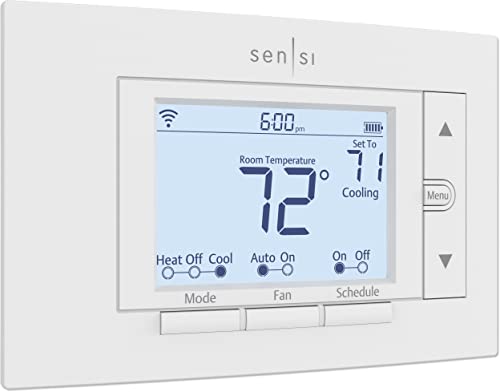
- ✓ Easy DIY installation
- ✓ Saves energy effectively
- ✓ Discreet, traditional look
- ✕ Limited advanced features
- ✕ App interface could be smoother
| Connectivity | Wi-Fi (2.4 GHz and 5 GHz bands) |
| Compatibility | Works with most HVAC systems using common (c-wire) or alternative wiring |
| Display | Digital touchscreen interface with physical buttons |
| Power Source | Hardwired (c-wire not required in most cases) |
| Energy Savings Features | Flexible scheduling, remote access, usage reports |
| Smart Home Integration | Alexa compatible |
There was a time I hesitated to upgrade my old thermostat because I didn’t want a complicated install or invasive wiring. When I finally got my hands on the Sensi ST55 Wi-Fi Smart Thermostat, I was pleasantly surprised by how straightforward it was to set up.
The built-in level made it easy to get it perfectly aligned, and the step-by-step app instructions guided me through the entire process without a hitch.
This thermostat looks just like a traditional one, so it fit seamlessly into my wall without any patching or painting. It’s compact, with buttons that feel sturdy and responsive, giving me that familiar tactile feel I’m used to.
The installation didn’t require a common wire, which was a huge relief, since my system is pretty basic.
Using the app, I appreciated the remote access feature—being able to adjust the temperature from my phone is a game changer for busy days. I also liked that it offers flexible scheduling, helping me save around 23% on my energy bills, according to the reports.
The device’s energy-saving perks are clear, and I’ve already noticed a difference in my monthly bill.
One feature I didn’t expect was the smart maintenance alerts. It keeps tabs on my HVAC’s performance and reminds me to change filters or check my system, which feels like having a little HVAC expert at home.
Privacy is also a top priority here—Sensi won’t sell your data, which gives peace of mind.
Overall, this thermostat hits the sweet spot between affordability and smart features. It’s simple, reliable, and helps me stay comfortable while saving energy.
For a DIY-friendly upgrade, I’d definitely recommend it to anyone wanting smart control without the high price tag.
Sensi Lite Smart Thermostat ST25, Wi-Fi, Alexa, Energy Star

- ✓ Easy DIY installation
- ✓ User-friendly app control
- ✓ Saves about 23% on energy
- ✕ C-wire needed for some systems
- ✕ Limited advanced features
| Connectivity | Wi-Fi (802.11 b/g/n) |
| Compatibility | Works with most HVAC systems; requires C-wire for heat pump and heat/cool systems |
| Energy Savings Certification | ENERGY STAR certified |
| Control Options | Remote control via iOS and Android mobile app |
| Installation | DIY with built-in level and step-by-step instructions |
| Price | USD 65.98 |
There was something satisfying about finally getting the Sensi Lite Smart Thermostat ST25 into my home after adding it to my wishlist for months. The sleek, minimalist design immediately caught my eye, and I was eager to see if it lived up to the hype.
The built-in level made installation super straightforward—no guessing if it was crooked.
It works with most HVAC systems, and I appreciated the clear, step-by-step instructions that made setup feel almost effortless. I didn’t need a C-wire for my system, which was a huge plus, especially since many budget-friendly thermostats often require extra wiring.
The physical size is compact but solid, fitting nicely on my wall without feeling bulky.
Controlling the thermostat from my phone is a game-changer. The app is intuitive, responsive, and offers flexible scheduling, which helps me save on energy.
I’ve already noticed my energy bills are lower, thanks to the energy-saving features like geofencing and usage reports. Plus, I feel good knowing my data isn’t being sold or used for targeted ads.
The Wi-Fi connection is reliable, and I love being able to adjust the temperature remotely. The Alexa compatibility is seamless, so I can just ask for the temperature change without lifting a finger.
Overall, this thermostat packs a lot of smart features into an affordable package, making it a great upgrade for anyone wanting smarter control without breaking the bank.
What Should You Know About Smart Thermostats?
Smart thermostats are advanced heating and cooling control systems that offer convenience and energy savings.
- Energy Efficiency: Smart thermostats can learn your schedule and preferences, adjusting the temperature accordingly to reduce energy consumption. This means you can save on your energy bills while maintaining comfort, as they optimize heating and cooling when you’re home or away.
- Remote Access: Many smart thermostats come with mobile apps that allow you to control your home’s temperature from anywhere. This feature is particularly useful for making adjustments while you’re away, ensuring your home is always at your desired temperature upon your return.
- Integration with Smart Home Systems: The best affordable smart thermostats often integrate easily with other smart home devices, such as voice assistants and security systems. This allows for seamless control and automation, enabling you to set routines that enhance your home’s overall efficiency and convenience.
- Learning Capabilities: Some models have advanced learning algorithms that monitor your habits and adjust settings automatically over time. This feature not only saves you the hassle of manual adjustments but also helps in optimizing your energy usage based on your specific lifestyle.
- Geofencing: This technology uses your smartphone’s location to determine if you’re home or away, automatically adjusting the temperature to save energy when you’re not around. It helps in ensuring that your heating or cooling systems are not running unnecessarily, contributing to lower utility bills.
- Alerts and Maintenance Reminders: Smart thermostats can send alerts for temperature fluctuations, filter changes, and maintenance reminders. This proactive approach helps you keep your HVAC system running efficiently and can prevent costly repairs down the line.
How Do You Choose the Best Affordable Smart Thermostat?
Choosing the best affordable smart thermostat involves considering several key factors that can impact both functionality and cost-effectiveness.
- Compatibility: Ensure that the smart thermostat is compatible with your existing heating and cooling system. Some thermostats work only with specific types of HVAC systems, such as conventional, heat pump, or multi-stage systems, so it’s important to check compatibility before making a purchase.
- User Interface: Look for a thermostat with an intuitive user interface that is easy to navigate. A clear display and straightforward controls can significantly enhance the user experience, allowing you to set schedules and adjust settings without confusion.
- Smart Features: Consider the smart features offered, such as Wi-Fi connectivity, mobile app control, and learning capabilities. Features like geofencing can help optimize energy usage by adjusting the temperature based on your location, while learning thermostats can adapt to your schedule over time.
- Energy Savings: Evaluate the energy-saving potential of the thermostat. Many affordable smart thermostats are designed to reduce energy consumption, which can lead to lower utility bills, especially if they include features like energy reports or reminders for maintenance.
- Installation Process: Investigate how easy the thermostat is to install. Many models offer straightforward installation procedures that can be completed without professional help, which can save you additional costs. Look for ones that come with detailed instructions and installation videos.
- Brand Reputation: Research the reputation of the brand and read customer reviews. A well-regarded brand with positive feedback is more likely to provide a reliable product, good customer support, and regular software updates, enhancing the overall value of your investment.
What Key Features Make a Smart Thermostat Affordable and Effective?
Key features that contribute to the affordability and effectiveness of smart thermostats include:
- Energy Savings: A smart thermostat can significantly reduce energy costs by optimizing heating and cooling schedules based on user habits and preferences.
- Remote Control: Many smart thermostats offer mobile app integration, allowing users to adjust their home temperature from anywhere, enhancing convenience and control.
- Learning Capabilities: Some models have learning algorithms that adapt to user behavior over time, automatically adjusting settings for maximum efficiency without manual input.
- Compatibility with HVAC Systems: The best affordable smart thermostats are designed to work with a variety of heating and cooling systems, making them versatile for different homes.
- Geofencing Technology: This feature allows the thermostat to detect when users are home or away, adjusting temperatures accordingly to save energy when the house is empty.
- Simple Installation: Many affordable smart thermostats come with user-friendly installation guides and do not require professional help, reducing upfront costs.
- Energy Usage Reports: These thermostats often provide insights into energy consumption patterns, helping users understand and reduce their energy use effectively.
- Voice Control Integration: Compatibility with smart home systems like Amazon Alexa or Google Assistant allows users to control their thermostat through voice commands, adding convenience.
Which Affordable Smart Thermostats Offer the Best Value?
The best affordable smart thermostats offer great features at a budget-friendly price.
- Ecobee Lite SmartThermostat: This model provides a balance of advanced features and affordability, including a user-friendly app and compatibility with Alexa.
- Honeywell Home T9: Known for its easy installation and room sensor capabilities, the T9 can help optimize heating and cooling in different spaces within your home.
- Google Nest Thermostat: With a sleek design and intuitive learning capabilities, this thermostat can adapt to your schedule to save energy and reduce costs.
- Emerson Sensi Touch Wi-Fi Thermostat: Featuring a large touchscreen display and easy-to-use app, the Sensi Touch also supports geofencing to adjust temperatures based on your location.
- Wyze Thermostat: This budget-friendly option offers essential smart features and can be controlled via the Wyze app, making it a great choice for cost-conscious consumers.
The Ecobee Lite SmartThermostat is designed for comfort and convenience, equipped with features like remote sensors to detect temperature variations in different rooms, ensuring balanced heating and cooling. It’s compatible with a variety of smart home systems and allows for easy control through voice commands with Alexa.
The Honeywell Home T9 is notable for its room sensor technology, which allows the thermostat to focus on heating or cooling specific areas based on occupancy. Its simple setup process and compatibility with multiple smart home platforms make it a practical choice for homeowners looking to enhance their energy efficiency.
The Google Nest Thermostat stands out for its ability to learn user habits and preferences, automatically adjusting temperatures based on when you’re home or away. Its sleek design and integration with Google Home make it a stylish and functional addition to any modern home.
The Emerson Sensi Touch Wi-Fi Thermostat is lauded for its user-friendly interface and robust mobile app, which allows users to schedule and monitor their heating and cooling from anywhere. The geofencing feature adds another layer of convenience, automatically adjusting your home’s temperature based on whether you’re nearby.
The Wyze Thermostat is designed to offer smart features at a lower price point, making it accessible for a wider audience. With a clean interface and integration with the Wyze ecosystem, it provides essential functionalities for smart home enthusiasts without breaking the bank.
How Can an Affordable Smart Thermostat Reduce Your Energy Costs?
An affordable smart thermostat can significantly reduce your energy costs by optimizing your heating and cooling systems.
- Energy Scheduling: Many smart thermostats allow users to create personalized schedules that align with their daily routines. By automatically adjusting the temperature when you’re away or asleep, these devices minimize energy usage during off-peak hours, leading to lower utility bills.
- Remote Control: Affordable smart thermostats often come with mobile app connectivity, enabling users to control their home temperature from anywhere. This feature allows for last-minute adjustments, ensuring that you don’t waste energy heating or cooling an empty home.
- Learning Algorithms: Some smart thermostats utilize learning technology to adapt to your habits over time. By analyzing your preferences and adjusting accordingly, they can optimize energy consumption without sacrificing comfort, ultimately enhancing efficiency and reducing costs.
- Energy Usage Reports: Many models provide detailed reports on energy usage and suggest ways to save. By understanding your consumption patterns, you can make informed decisions about when to adjust settings, leading to further savings on your energy bills.
- Integration with Smart Home Systems: Affordable smart thermostats can often integrate with other smart home devices, such as sensors and smart lights. This interoperability allows for comprehensive energy management, as the thermostat can respond to changes in occupancy and adjust conditions accordingly.
What Installation Options Are Available for Affordable Smart Thermostats?
Several installation options are available for affordable smart thermostats, catering to different user preferences and technical skills.
- DIY Installation: Many affordable smart thermostats are designed for easy installation, allowing homeowners to set them up without professional help. These models typically come with comprehensive instructions and require basic tools, making them accessible for tech-savvy users who are comfortable with home improvement tasks.
- Professional Installation: For those who prefer a hands-off approach, many retailers offer professional installation services for smart thermostats. This option ensures that the thermostat is properly installed and configured, which can be particularly helpful for more complex HVAC systems or for users who are unsure about electrical work.
- Smart Home Integration Services: Some smart thermostat brands partner with smart home service providers to offer integrated installation as part of a broader smart home setup. This can include configuring the thermostat along with other smart devices, such as lights and security systems, to create a cohesive smart home experience.
- Remote Assistance: Certain smart thermostat manufacturers provide remote assistance through their apps or customer support channels. Users can receive guidance while installing their thermostats, allowing them to troubleshoot issues or ask questions in real time, which can enhance the DIY experience.
- Compatibility Checks: Before installation, many companies provide online tools or customer support to check compatibility with existing HVAC systems. This ensures that users select the right model for their home and can prevent installation issues down the line.
How Do User Ratings Influence the Choice of Affordable Smart Thermostats?
User ratings play a crucial role in influencing consumer choices for affordable smart thermostats.
- Trustworthiness: User ratings often serve as a trust signal for potential buyers, as they reflect real experiences from other consumers.
- Feature Evaluation: Ratings can highlight specific features that are well-received or criticized, helping buyers decide which thermostat best fits their needs.
- Comparison Across Brands: User ratings allow consumers to easily compare different brands and models, making it simpler to identify the best affordable options.
- Impact on Sales: Thermostats with higher ratings tend to attract more attention, often leading to increased sales and visibility in marketplaces.
- Community Feedback: User reviews often provide insights into long-term performance and reliability, which are critical for making an informed purchase.
Trustworthiness: User ratings create a sense of reliability as they are based on the experiences of actual users. When potential buyers see high ratings, they may feel more confident in their purchase decision, believing that the product has been tried and tested by others.
Feature Evaluation: Ratings often come with comments that detail specific features, such as energy efficiency, ease of installation, or compatibility with smart home systems. This information helps consumers assess whether a thermostat meets their specific requirements and preferences.
Comparison Across Brands: With numerous options available, user ratings provide a straightforward way to compare different smart thermostats. Shoppers can quickly identify which affordable models stand out in terms of quality and functionality based on aggregated ratings.
Impact on Sales: Higher user ratings can significantly influence sales figures. Products that receive positive feedback are often prioritized by retailers and platforms, resulting in better visibility and more sales opportunities for those thermostats.
Community Feedback: User reviews often include long-term insights that are invaluable for potential buyers. Comments regarding the durability and performance over time can inform decisions, as buyers want to invest in a product that not only has good initial features but also stands the test of time.
Related Post: